Equalizer music player booster2.28.02
Publisher Description
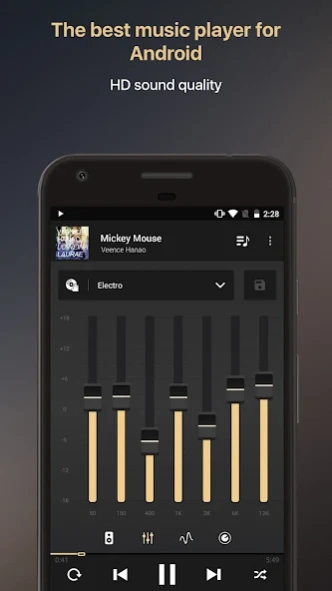


All-in-one music player for Android with 7-band equalizer and bass booster.
Discover Equalizer+, the best all-in-one Music Player, Equalizer & Bass Booster for Android that offers brilliant HD sound quality.
Improve your music using the pro 7-band equalizer and enjoy a powerful bass volume booster. All that for free.
And for a perfect music listenning experience, Equalizer+ will achieve smooth transitions between your tracks for you.
Quality-focused, free, and easy-to-use, Equalizer+ offers and beautiful and friendly interface for you to enjoy unique music moments.
*Mix, edit and customize the sound of your tracks. Take control of your audio experience*
THE BEST ALL-IN-ONE PRO MUSIC PLAYER
- 7-band equalizer (from bass to high): tailor your audio to your taste
- 10 pro sound presets based on various genres: acoustic, classical, dance, electro, flat, hip-hop, jazz, pop, R&B, and rock for the best audio experience
- possibility to save and edit your own custom presets
- powerful bass volume booster: control the depth of your track with the booster level control
- visualizers: link audio with visuals. Watch your sound move thanks to 5 differents awesome effects
- DJ mode (fade): the app will take care of the transitions for you
- queue system: prepare your tracklist in advance
- background play mode: listen to your favorites songs while consulting other apps
- 3-status'repeat' function: repeat 1 song, repeat a playlist, no repetition
- shuffle function: play your songs in random mode
- music progression bar: for an easy navigation within your sound
ACCESS ALL YOUR FAVORITE TRACKS
- local music: automatically retrieve your local songs on the app
- local folders access
- create playlists directly from the app
- access in a clic: recent tracks, songs, artists, albums , genres, and playlists
- contextual pro search feature that gives results sorted by songs, artists, albums, or playlists
- edit the metadata of your tracks directly from the app
MORE THAN JUST A PLAYER
- 2 widgets available: access from your main screen the presets, and/or the player controls
- sleep mode: set your timer...and fall asleep listening to your favorite tracks!
- clip finder: free yourself from searching music videos, the app can automatically find them for you
- network visibility option: when activated, users connected to the same wifi network can access each other musical library from Equalizer+. No download necessary, just local streaming.
- cover arts option: we can automatically find covers for your tracks if needed
- possibility to share your favorite tracks to your friends directly from the app
- compatibility Android TV, Android Wear, Android Auto
- all features are free! The only inapp purchase is the 'no-ad', that removes the ads, but don't worry awesome discounts are available every week :)
ABOUT US
- website: http://equalizerpl.us/
- facebook: https://www.facebook.com/equalizerplus/
- twitter: https://twitter.com/EqualizerPlus
A question? A suggestion? Needs help with something? Contact our team at support@equalizerpl.us :)
About Equalizer music player booster
The company that develops Equalizer music player booster is MWM - AI Music and Creative Apps. The latest version released by its developer is 2.28.02. This app was rated by 5 users of our site and has an average rating of 2.0.
To install Equalizer music player booster on your Android device, just click the green Continue To App button above to start the installation process. The app is listed on our website since 2026-01-30 and was downloaded 161 times. We have already checked if the download link is safe, however for your own protection we recommend that you scan the downloaded app with your antivirus. Your antivirus may detect the Equalizer music player booster as malware if the download link to com.djit.equalizerplusforandroidfree is broken.
How to install Equalizer music player booster on your Android device:
- Click on the Continue To App button on our website. This will redirect you to Google Play.
- Once the Equalizer music player booster is shown in the Google Play listing of your Android device, you can start its download and installation. Tap on the Install button located below the search bar and to the right of the app icon.
- A pop-up window with the permissions required by Equalizer music player booster will be shown. Click on Accept to continue the process.
- Equalizer music player booster will be downloaded onto your device, displaying a progress. Once the download completes, the installation will start and you'll get a notification after the installation is finished.
Program Details
System requirements
Download information
Pricing
Version History
version 2.28.02
posted on 2026-01-30
version
posted on 2024-07-24
New feature: access your music by genre!
Improvement of the folder navigation upon users' request: you can now play or add all the tracks of the current folder.
Several bug fixes regarding the in-app purchases.
Version 2.4.1:
The Bassboost feature should be much more stable now. Thanks to your feedback we fix a lot of bugs for Galaxy S4 and tablets
version
posted on 2021-07-06
What's new in version 2.8.0:
- Fixed several bugs
If you like this version, please take a moment to rate it on the store, it is really helpful for us :)
version 1.1.3
posted on 2014-10-15
Several fixes and updates
